Posts

Adding a read only Calendar to your class Team
Image
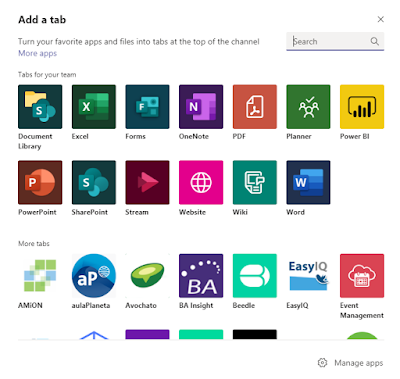
A frequent request from teachers at Hagley College is to be able to add a Calendar to Teams which is read only for students but editable for teachers. It is a rather complicated process to do this, but it can be done and it is worth the effort! ·           Go to the Team and click on  Files ·           Click  Open in SharePoint ·           Click  Site Contents ·           Click the  New  button and choose  App ·           Search for "calendar" ·           Click on the Calendar App and name the calendar and click create ·           Click on the name of the calendar to Open the Calendar ·           On the l...

QR Codes and Project Based Learning

Image
At Hagley College the Year 9 Connected Class (Project Based Learning across Science, Social Studies and English) have been using Quick Response (QR) codes to enable greater depth of thinking and student agency with their projects. Students used the Liberatory Design thinking process to design and create buildings and facilities on a make believe island. Students were given specific parameters about the types of construction allowed on the island, each building or resource must have at least three sustainability features and use of the building or facility must take in to well-being of the users. Students were tasked with creating three prototypes of their building or resource before their final product was created. Some students choice to prototype online using Minecraft for Education, 3D architecture software or some created physical prototype models. QR codes linked to Sway or YouTube video clips helped students to delve in to more depth and to help explain their models. ...

Self Directed Learning and Year 9 Maths

Image
Students in a Year 9 Maths class at Hagley College are leading their own learning with the support of Microsoft Teams. Students are completing a Statistical Inquiry and are using a Word document Assignment to show their learning. Teams enables each student to edit their own copy of an assignment and the teacher is able to view and edit each assignment at any time too. The Statistical Inquiry assignment contains questions to scaffold student learning and the questions link to an Education Perfect activity or show a page in students Maths textbook. Students are able to lead their own learning by clicking on links or looking up pages of their textbook in their own time to complete their inquiry. Using technology to support self directed inquiry based learning enables the teacher to do less "whole class" teaching and provide more individualised support to students as they need it. The information from Education Perfect also enables the teacher to see individual stu...

Minecraft for teaching and learning PLD session in Christchurch

Image
Minecraft is an immensely popular game amongst students at Hagley College. Many teachers are also realising the value of Minecraft's ability for students to demonstrate their learning via creation. The Microsoft New Zealand Education team are conducting a free Professional and Learning Development session for teachers in November. Part of the session will introduce the newly created Ngā Motu world: a uniquely Aotearoa world inside of Minecraft. https://samuelmcneill.com/2019/09/02/introducing-nga-motu-minecraft-education-edition-training-series/ The session is free and is strongly recommended for teachers. The session is on the 12th November at St Andrew’s College, 347 Papanui Road. If you would like to attend, please click this registration link .

Digital Ink in Maths

Image
Digital Ink in Maths Image retrieved 27 August 2019 from Youtube: https://www.youtube.com/watch?v=50i0_3kSjg0 English Language teacher Suhaylah uses OneNote and digital ink with her class who are learning about measurement in Maths. Using her touchscreen laptop and stylus, Suhaylah can draw, highlight and colour to create much richer learning opportunities. "I really like the ability to use different colours and thicknesses of the pen so I can clearly show concepts which we are learning. The Ink to Shape tool is great as it enables me to draw a rough outline of a shape and OneNote will automatically alter my drawing to be a perfect shape".  Using the open canvas of OneNote means Suhaylah can zoom in and out of images and text easily. Another advantage of using OneNote over writing on the board is that students can access everything that is completed rather than for it to be erased from the traditional whiteboard and never to be seen again. If you would like to kn...

Using Microsoft Forms for Feedback

Image
Hagley College Drama Teacher, Fiona Brownlie, uses Microsoft Forms to gain feedback from students in her classes. Microsoft Forms is part of Hagley College's Office 365 platform and enables teachers and students to quickly and easily create custom quizzes, surveys, questionnaires. "Using Forms meant I could easily gain feedback from my students about how they are going in my class. I asked the students a range of questions about what they enjoy in class, as well as what I can do to better support their learning. The feedback from Forms helped me to plan and structure my next unit of work. I was initially apprehensive about creating an online questionnaire, but it was really easy to navigate. The graphs created from the results calculated and organised some useful statistics for me". Forms can be found via visiting the Hagley College Portal and selecting Office 365, then Forms.  If you would like to create a Quiz for your students, click here , otherwi...

Microsoft Innovative Educator Experts at Hagley College

Image
Retrieved from Leeds University on 30th May 2019 from:  https://edtechnology.co.uk/Article/leeds-beckett-team-are-worlds-first-university-mie-experts/ The Microsoft Innovative Educator Expert (MIEE) Programme is a professional learning programme for teachers. The MIEE award recognises teachers from all over the world who are are demonstrating enhanced digital capability and innovative practice to support students to be future-ready. Currently there are four Microsoft Innovative Educator Experts at Hagley College: Elvina Stephens, Carolyn Green, Tamara Yuill-Proctor and Nathan Walsh. As an MIE Expert you are part of a group of teachers who are passionate about 21st Century teaching practice and have the opportunity to work directly with Microsoft Education leaders. How can I become a MIEE?  Step 1: Join the Microsoft Educator Community , and complete your profile. Step 2: Complete courses to the value of 1,000 points on the Microsoft Educator Community to beco...

Assignments in Teams

Image
Hagley College Science teacher Jo uses the Assignments tab in Teams for her Pre-Health class assessments. The Assignments tab allows all students to complete their work within the same location, making it simple for Jo to check progress and mark completed work. Using Assignments eliminates the need for students to email their teacher attachments or share links to their work. Teachers are able to provide feedback (even before the due date) by inserting comments straight in to the student's work. This can be done by right clicking and insert comment. When marking the final copy, there is a useful marking rubric option. Rubrics can be created within the assignment or pre-created rubrics can be uploaded. These rubrics are easy to follow and are very familiar to teachers who have experience with NCEA assessment. If you would like to know more about using Assignments in Teams, please contact or drop in to see see Nathan, Hagley's eLearning Leader. Or you can read more about cr...

Minecraft and Maths

Image
9DM Maths students have been learning about Shape and Measurement and applying their knowledge to solve a real world problem. Students looked at the footprint of where a new classroom block is to be built on site at Hagley College and used their Maths knowledge to design their ideal learning environment. After a presentation and tour around the existing classrooms from the Hagley College Learning Leader of Practical Design, students took notes on what the requirements were for the new building as well as incorporating their best ideas from their previous schools and their own research. Students had a rubric of what was required for the new building so they knew where they were heading. Many of the requirements from the rubric were Maths based, while others included creativity of design, future focus and real world application. Some students chose to create their design using grid paper, some via 3D architect online tools and many chose to represent their design using Minecraft. St...

Minecraft and Year 10 Music

Image
Retrieved 30 March from:  https://minecraft.wonderhowto.com/news/minecraft-worlds-weekly-workshop-music-my-ears-0130206/ Hagley Music teacher Kevin is using Minecraft for education to help his students to understand the difference between notes, tempo and related musical terms. Minecraft is one of the world's most popular video games where players can create almost anything using 1m x 1m x 1m blocks. One of the great things about Minecraft is that it allows for students to be creative and think critically while self directing their learning. In Kevin's Year 10 Music class, students are using special types of blocks called Redstone and Note Blocks to read and understand music theory and play melodies. These specific Blocks play the sound as well as display a coloured note, allowing students to see and hear the note as it is played. Minecraft Note Blocks and Redstones cover the piano scale and allow for a range of musical instrument sounds from a guitar and a xylophone, ...